INF1030: Introduction to Information Technology - Homework Assignments
| HW8 |
Submit the following to the 'HW-Binary To Decimal Conversion Program' folder on the Lessons tab of Angel. Write a program the asks the user to enter a binary number (i.e. only 1's and 0's). When the user presses a button the program should display a message box that contains the decimal value for the binary number. You may find it useful to review the code for the program "AddUpDigitsInNumber". Click here for the sample programs (you can also get to this from the main page for this course). Your program will need to access the individual digits of the user's binary number similar to the way the code for the "AddUpDigitsInNumber" program does. |
|---|---|
| HW7 |
Answer the following questions on a piece of paper. Hand inthe paper at the beginning of the next class. Show how you got your answer, do not just write a number as the answer.
|
| HW6 |
Answer the following questions on a piece of paper. Hand inthe paper at the beginning of the next class. Show how you got your answer, do not just write a number as the answer.
|
| HW5 |
Submit the following to the 'HW-primes' folder on the Lessons tab of Angel. A prime number is a number that is divisible by only 1 and itself. For example, the numbers 1, 2, 3, 5, 7, 11 are all examples of prime numbers. However, 4 and 6 are NOT prime since they are divisible by 2. The number 9 is also NOT prime since it is divisible by 3. Write a program that asks the user for a number, N. The program should then display all of the prime numbers from 1 through N. For example, if the user specifies the number 20, the program should list the following prime numbers: 1,2,3,5,7,11,13,17,19 |
| HW4 |
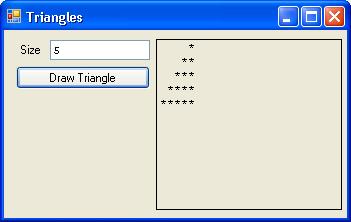
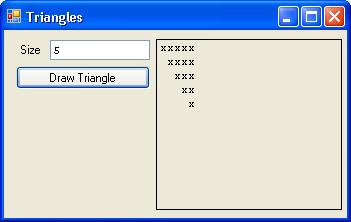
Submit the following two programs to the 'HW-Triangle1' and 'HW-Triangle2' folders on the Lessons tab of Angel.
Don't forget to use a monospace font (Courier or System) for the label that will contain the triangle - as the space character must take up the same amount of room as an asterisk. Zip up the complete folder for each program separately and submit the zip files to the appropriate folders on the lessons tab in Angel. |
| HW3 |
Calculate the values of the following boolean expressions. Pay attention to the order of operations (first NOT then AND then OR)
You do not have to submit this. |
| HW2 |
Julian Date to Month and Day Create a program that asks the user to enter a Julian Date (i.e. a single number that represents a single day of the year - eg. Jan 31 is 31, Feb 1 is 32, Feb 2 is 33, Dec 31 is 365, etc) Assume that the year is NOT a leap year. Zip up the entire project folder and submit it to Angel |
| HW1 |
Changing button text Create a program that contains two different buttons. The first time the user presses one button the text on the other button should change. Zip up the entire project folder and submit it to Angel |