| HW # |
Date assigned |
Due Date |
Assignment |
Comments |
| FINAL EXAM |
|
F Jan 6, 2005 |
Click here to see the topics for the final.
|
|
| MIDTERM EXAM |
|
M Nov 14, 2005 |
The midterm will cover everything that we have done from the beginning of the semester. Including:
- Office 2003 book topics
- Essential Computer Concepts
- Exploring the basics of Windows XP
- Managing your files
- Using common features of Microsoft Office 2003
- Excel Chapters 1-3 from the Office 2003 book
- The concepts in the following links on yrosenthal.com:
- Basic Windows Terms
- Windows Explorer
- Binary and Decimal Numbers (you ARE responsible for converting from Binary to Decimal but you are NOT responsible for converting from Decimal to Binary)
- Excel formulas
- How Excel stores Dates and Times
|
|
| HW8 |
M Nov 8, 2005 |
W Nov 10, 2005 |
Using the following spreadsheet:
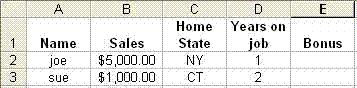
write a formula to be placed in cell E2 that calculates the employee's bonus as follows:
The bonus is $5,000 times the number of years on the job if either
- the person made at least $10,000 in sales
OR
- the person is from CT and they are on the job for exactly one year and they made at least $5,000 in sales
If the person didn't qualify for the larger bonus then :
- The bonus is $2,000 for anyone from NY or NJ
- The bonus is $1,000 for anyone from CT
|
Click here to see a powerpoint presentation that contains an explination of the solution for this HW problem. |
| HW7 |
M Oct 31, 2005 |
W Nov 2, 2005 |
Click here to see the hw assignment.
|
|
| HW6 |
M Sept 26, 2005 |
W Sept 28, 2005 |
Click here to see the hw assignment.
|
|
| HW5 |
W Sept. 21, 2005 |
W Sept. 26, 2005 |
Order of operations in Excel
Using the following spreadsheet:

Create a Word document or a Notepad document that shows step by step how Excel would figure out the value of the following formula. Upload the word/notepad document to the HW5 folder on Angel.
=5*(3+2*SUM(A1:C3,10)-2)^3-SUM(SUM(A2:B2),C1)/4
|
|
| HW4 |
M Sept 19, 2005 |
W Sept. 21, 2005 |
Simple spreadsheet
- Read Tutorial 1 for Excel in the Office 2003 book
- Create a spreadsheet that lists the courses you are taking this semester. The sheet should list
- the name of the course
- the name of the professor for the course
- the number of credits for the course
- Create 3 different formulas in 3 different cells. Each formula should calculate the sum of the credits in the courses. All formulas will yield the same results, but each formula will be written in a different way. The formulas should be written in the following ways:
- One formula should add up the grades using a formula with + signs (e.g. =a1+a2+a3)
- One formula should use the SUM funciton with each cell listed individually (e.g. =SUM(a1,a2,a3)
- One formula should use the SUM function with a range of cells (e.g. =SUM(a1:a3)
NOTE: DO NOT JUST TYPE IN THE TOTAL DIRECTLY. YOU MUST USE FORMULAS. ALSO, DO NOT TYPE THE GRADE VALUES DIRECTLY INTO THE FORMULAS (e.g. =97+85+100). YOU MUST USE CELL REFERENCES (e.g. =a1+b1+c1) TO REFER TO THE CELLS THAT CONTAIN THE GRADES.
|
A simpler version of this assignment was originally listed as being due on 19th. If you handed that one in already, simply modify your solution and resubmit it to the same folder by the 21st. |
| HW3-b |
W Sept. 14 |
W Sept. 21 (see comments) |
Analog, Digital, Binary
- Read in "Computer Concepts" book: p. 60-67, p. 233-234(Analog and digital signals)
- Read first part of powerpoint presentation - "Binary and Decimal Numbers"
- Do questions 3-a,d,f,h and question 5-all parts on Page 67 in the Computer Concepts book (show your work). Upload a Word file with your work to the Angel HW3 folder.
|
I had originally incorrectly assigned problem #2 instead of #3. If you already did #2, you do not have to hand in #3. Otherwise you have until Sept 21 to hand in the HW with problem #3 and #5. |
| HW3-a |
M Sept. 12, 2005 |
W Sept. 14, 2005 |
Files and folders
- Read and understand powerpoint presentations: "Basic Windows Terms" and "Windows Explorer".
- Create a set of folders and files as follows.
- Create one folder that includes one word file and two additional folders. The Word file should be an empty word file. NOTE THE SIZE OF THE EMPTY WORD FILE (it will not be zero).
- In the first sub-folder from the previous step, create another Word document that is at least 50 KiloBytes(KB) but not more than 100KB. The contents of the file can be whatever you wish.
- In the 2nd sub-folder from step 1, create another Word document that is at least 100KB but not more than 200KB.
- Create a compressed folder (i.e. zip file) that contains your entire folder hierarchy. NOTE THE SIZE OF THE COMPRESSED FOLDER.
- Upload the compressed file to the HW3 folder on Angel. In the notes on your submission, write down (1) the size of the "empty" Word file (2) the size of the compressed folder and (3) Why do you think the size of the empty word file is NOT zero.
|
|
| HW2 |
W Sept. 7, 2005 |
M Sept. 12, 2005 |
Understanding basic Microsoft Windows
- Read and understand all the pages in the sections "Exploring the Basics of Microsoft Windows XP" and "Managing Your Files" at the beginning of the Office 2003 book.
- Read and understand the entire "Orientation" section at the beginning of the "Computer Concepts" book.
- Bring your Office 2003 book to every class (not the concepts book)
|
|
| HW1 |
W Aug 31, 2005 |
W Sept. 7, 2005 |
Using the Angel system, recieving email from your ymail account
- Make sure that you have access to your Angel account, your ymail account (i.e. YU email) and your network account. If you have any trouble, speak to the folks in Belfer Hall room 1315.
- Submit a file of your choosing to the "Submit folder" (AKA dropbox) for HW1 on Angel (please make it a small file).
- I will be sending an email to your ymail account on Friday morning. To recieve the email you can either check your mail on http://webmail.yu.edu or forward your ymail to your personal email account before Friday - see http://www.yu.edu/ymail ). The email that I send will have an attachment. You must detach the file that I send and then upload the file to the same Angel dropbox.
|
|