HW #6, Management Information Systems (INF1020), Prof. Rosenthal
This assignment has four parts to it. In Parts I through Part III of this assigment you will create an Excel spreadsheet that tracks the grades that a student received in each class for a particular semester in college. The following is an example of what your spreadsheet might look like when you are finished with Part I - Part III. In part IV of this assignment you will create additional tabs in your spreadsheet with additional information (not shown here but described below in Part IV).
These cells contain Excel formulas.









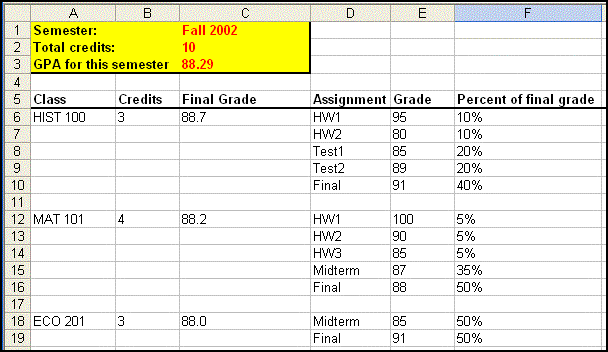
PART I: For each
class, the spreadsheet should contain the following information
- the
name of the class
- the
number of credits for the class (this will be used in the next part, see
below)
- a list
of all the assignments and tests for the class
- The %
that each assignment or test counts towards the final grade. There should
be a different % for each assignment or test.
- the
numerical grade (0 - 100) received on each one of the assignments and tests
- A
formula that calculates the final grade for the class. The final grade
should be a numerical grade from 0 ‑ 100 (not a letter
grade). The formula should use
cell references, NOT actual numbers. If you create the formula
correctly then changing the grade for a particular assignment will
automatically change the final grade for the class. The formula should be
calculated as follows:
- multiply
the grade for each assignment (use cell references) by the percent that
the assignment counts towards the final grade (again, use cell
references).
- add
up all the values from the previous step
Change the name on the tab to be "Fall2004" to indicate the semester that the classes were taken.
PART II: Create a formula (preferably in a cell at the top of the spreadsheet) that adds up the total amount of credits for all classes that the student took that semester. Again, this formula should use cell references, NOT actual numbers. If you create the formula correctly then when you change the number of credits for a particular class the number of credits for the semester will automatically be updated. Make sure to include a "label" (i.e. descriptive text) in a neighboring cell that describes what this number is.
PART III: The spreadsheet should also contain a single formula to calculate the overall "weighted average" for the semester. The formula should use cell references and NOT actual numbers. The formula should contain the math to do all of the following:
1) In a single formula, multiply the final grade for each class (use the correct cell references) by the number of credits for that class (using the correct cell references) and add up all of these products
2)
In the same formula, divide the value from step 2 above by the total number of credits
for all classes (The total number of credits for the semester should already be
calculated as a formula in another cell as described in PART II above. Use a
reference to this cell).
Include 3 classes on the spreadsheet and at least 3 tests or assignments for each class.
PART IV: In this part you will expand on the work you did in Part I - Part III.
Create 2 additonal worksheets (i.e. tabs) in the same workbook (i.e.
file) that you used for PartI - Part III. The first tab should contain the work
from parts I,II,III. The next two tabs will contain similar
information to what you have on the first tab. However each tab will represent
a different semester. The names on the tabs should be the names of the
semesters, e.g..: "Fall2002" , "Spring2003" and "Fall2004"(without
the quotes). Follow the same format for the new tabs as you did for the
original tabs. Each semester should have different courses, numbers of credits
and different assignments for each course.
HOW TO SUBMIT
Submit your homework by uploading it to Angel. There is an Angel "drop box" for this assignment on the "Lessons" tab for our class. To submit your file, do the following:
- Log into angel
- Click on the link for our class
- Click on the "Lessons" tab.
- Click on the link for the drop box
- Scroll down to the bottom of the page.
- Click on the "Browse" button.
- Locate the file with your homework on your computer.
- Click on the "Open" button.
- Click on the "OK" button.
GRADING
Your grade for this HW will be based on
- Following these directions.
- Correctness. The formula's must be correct.
- Clairity of presentation. Make it clear to anyone looking at the spreadsheet what the information is. Use any formatting (i.e. bold, large letters, colors, etc) that may help.