Sample Visual Basic .Net Programs
Instructions
The following are sample VB.Net programs. Each program is included with the full folder for the project in a single zip file. To run the programs or edit them you must do the following:
- Download the zip file by clicking on the filename
- You MUST unzip the file in order to run the
program or modify the code
(If you don't unzip the file then you will
be able to open the .sln file - see
next step - but it will not work correctly).
- To start editing the program in Visual Basic, double click on the file
with the ".sln" extension.
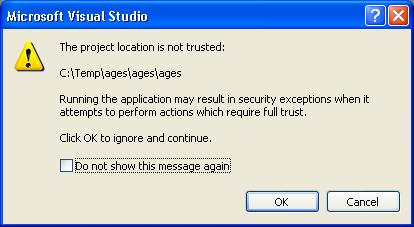
NOTE: when you double click on the .sln file you may get a dialog box
similar to the following. Since
windows doesn't know who created the program Windows assumes that it
might have been a hacker and the program might contain a virus. This
is NOT an issue for these programs so Click on the OK button to continue.
- Once you are in Visual Basic you can use the "Solution Explorer"
to view the individual files in the project. If you don't see
the Solution Explorer, choose the following menu choice:
"view | Solution Explorer"
- Most programs have a single Form1.vb file.
Double click on the Form1.vb file in the Solution Explorer window
to see the main form for the application.
| | Topics | Files | Description / Screen Shots |
|---|